MODEL REGISTRATION · THE STEP-BY-STEP GUIDE
Your start
on Chaturbate.
From your first username to a profile that feels like you. Every step, clearly explained.
The first registration screen can look deceptively simple: choose a username, set a password, and you are done. For a broadcaster, that is the beginning. Identity verification, account security and a few practical decisions come next. This guide gives you a clear route through them, so you are not juggling documents, writing a bio and hunting for microphone settings at the same time. Chaturbate is an adults-only platform: you must be at least 18 to register or appear in content.
Put your starter kit together
You do not need a perfect studio or a month of content ideas to begin. At registration, reliable access to your email, a valid identity document and a little unhurried time matter more. Good lighting for an ID photo is more useful right now than an elaborate backdrop for a future broadcast.
Choose a creator name that is separate from your personal life. Picture it in a profile header, in a viewer’s message and on a small phone screen. It should be easy to read and remember. Try a short combination you actually enjoy saying rather than a trail of random numbers. Avoid including your surname, birth year or the username you already use on private social accounts.
Keep a simple note for your creative decisions: username, creator email address, the time zone for your schedule and a few visual ideas. Keep your password separately in a password manager. A small amount of organization now prevents a familiar problem later: three similar email addresses, two unfinished bios and no clear record of what you decided.
Creator email
An address you can reliably access and keep secure.
Your ID
A valid original document you can photograph clearly.
A quiet moment
Good light, a little space and a camera for your selfie.
The registration form, field by field
Open the broadcaster registration page using the button below. If you already have an account, sign in first: a fresh bio does not require a second registration. From your account, Broadcast Yourself is the starting point for broadcasting; Broadcaster Registration contains the model onboarding instructions.
The public form includes a username, password, email, birthday and an I Am field. Email is marked optional on that page, but we recommend a creator address you can access. Use your real date of birth. Choose the options that apply to you in the dropdowns and follow the form’s own explanations.
Review your details in small groups. First, your username: is it spelled correctly and available? Next, your password: is it unique, and have you saved it somewhere you can find? Then your personal information: does it match your document? This is easier than searching for one missed field after several failed submissions.
Finally, read the terms and privacy policy before accepting them. Complete any human-verification challenge yourself if one appears. The example below explains how the fields work together. It is a learning diagram, not a working registration form, so there is no reason to enter or share personal information here.
A name people can remember
Username is your public creator name. Check the spelling before you submit: a lowercase l, uppercase I, zero and letter O can be confusing. A readable name is easier to share and recognize.
Your password and email work together
Use a unique password and a secure email account. Do not reuse a password from another service or keep it in a screenshot that might later be shared with a designer.
Accurate details come before your persona
Birthday means your real date of birth. A stage name belongs to your public identity; verification information must be accurate. Never try to solve a mismatch by editing a document image.
One final check before submitting
Read the linked documents, confirm your agreement and complete any requested check. If the form reports an error, correct the highlighted field. Submitting the form does not mean your broadcaster verification is approved.
Your ID and selfie: prepare for verification
This is where your creator persona makes room for accuracy. Chaturbate needs to establish that the people appearing in content are adults. Its official guide asks you to complete the broadcaster agreement and provide identification. If more than one person will appear, every participant needs verification; one approved account is not enough for everyone.
Your government-issued ID must be current and show a recognizable photo, legal name, date of birth and ID number. Passports and driving licences are among the examples in the guide. For the separate selfie, Chaturbate asks for your face without holding the document beside it. Follow your own verification prompts rather than substituting an old social media picture.
Before uploading, place the document on a flat surface and inspect your photo at a larger size. Can you read the small print? Is a finger covering a corner? Does glare hide a line of information? If the picture is poor, take another in better light instead of trying to rescue it with filters or retouching. The image should show the real document without alterations.
Three things you can check before uploading
Sharpness
Zoom in: letters and numbers should be readable without guessing.
Light
Move the light source if a reflection covers the photo or text.
The whole document
Keep it fully in frame, with fingers clear of the information.
See how Chaturbate explains verification
The official Chaturbate 101: Getting Verified video, in English, from the platform’s help centre. It loads when you choose to play.
Application submitted. What happens next?
After submission, follow the status in your account and messages from the platform. The public registration page says verification may take up to 24 hours. Treat that as guidance, not a promise that every application will receive an instant decision. Leave room for a correction instead of planning your first stream immediately after sending your documents.
If a submission is rejected, start with the actual reason. “The document is unreadable” and “this document is not accepted” are different problems. For the first, a clearer photograph may help. For the second, check the supported documents in the official instructions. Sending the same file again without addressing the issue is unlikely to move you forward.
If you need support, describe the stage you are on, the exact error message and the steps you have already tried. A useful support message does not need your password or sign-in codes. While you wait, write your profile introduction and draft a schedule. Neither requires a public broadcast, and both make the eventual launch less rushed.
Username taken
Try a second readable option. One unavailable name does not require reinventing your whole persona.
Photo declined
Read the reason, check the document and retake the relevant photo. Do not retouch the information.
Unclear status
Check your account and email, then contact official support with the stage you have reached.
Protect your account before going live
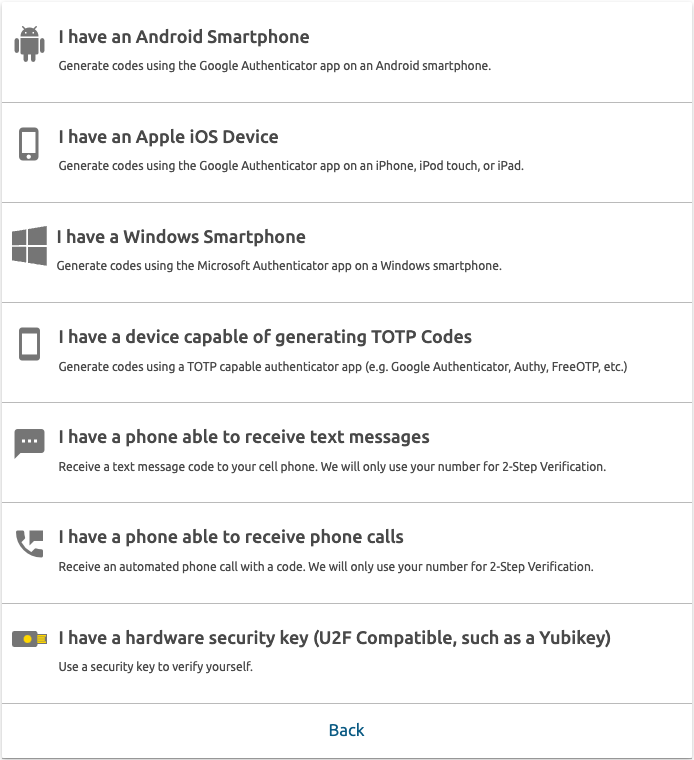
Getting access to your account and keeping it are separate jobs. Open the Security Center, which brings together email, password and two-step verification settings. An additional sign-in code means a stolen password alone should not be enough to get in. Check the methods currently available inside your account.
Think about recovery while everything still works. What would happen if you lost your phone or changed your number? Complete the recovery steps the platform offers and keep the information somewhere safe. Do not publish codes, setup QR codes or screenshots of your personal security settings. None of these is needed to help you design a profile.
 Enlarge screenshot ⤢
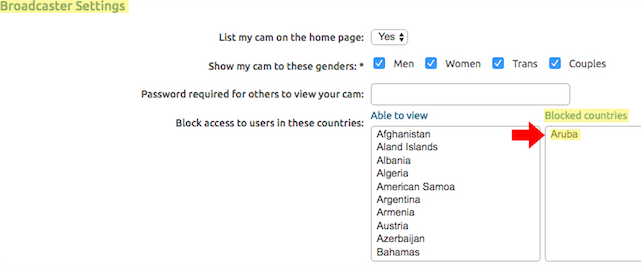
Next, decide your privacy settings. Under My Profile → Settings and Privacy → Broadcaster Settings, you can restrict countries and some regions before your first stream. Geoblocking is not a complete privacy guarantee: Chaturbate’s own guidance notes that some IP addresses may not be covered.
Also look for ordinary things in the camera view: an addressed envelope, a work badge, a mirror reflection or personal notifications. A separate browser window for creator work and silenced personal notifications help keep unrelated details out of your public presentation. Settings are useful, but your physical setup deserves a check too.
 Enlarge screenshot ⤢
Make your profile feel like you
Registration creates an account. A profile helps someone understand who they have found. Imagine a new visitor: they do not know you, have not learned your schedule and are deciding whether to stay. A short, personal introduction gives them more to work with than a wall of text in ten different fonts.
Start with three things: your personality, when people can usually find you and the links that matter. Think relaxed evening streams, a love of music and a clear schedule with a time zone. That is an example structure, not copy you need to borrow. Your details should sound like you, and you can add more sections as you learn what visitors actually ask.
Check the result on your phone. Is the heading readable? Do the links work? Is there space between sections? One expressive palette and a well-chosen profile image often do more than a pile of decorations. Our bio design guide explains the structure, and the template gallery offers ready-made visual directions.
Let your first screen answer: “Who are you — and why would I want to come back?”
Check the basics before your first stream
Before your first broadcast, make a local camera and microphone recording. Watch it as a visitor would: is the room too dark, is a fan humming in the background, and does the framing feel comfortable? A local test lets you adjust the basics without going live to the public.
Chaturbate supports browser broadcasting and OBS. Its official technical guide gives upload-speed reference points of 5 Mbps for standard quality and 10 Mbps or more for HD. Upload speed and stability matter, not just the headline download speed on your internet plan. For resolution and audio settings, use our separate OBS walkthrough.
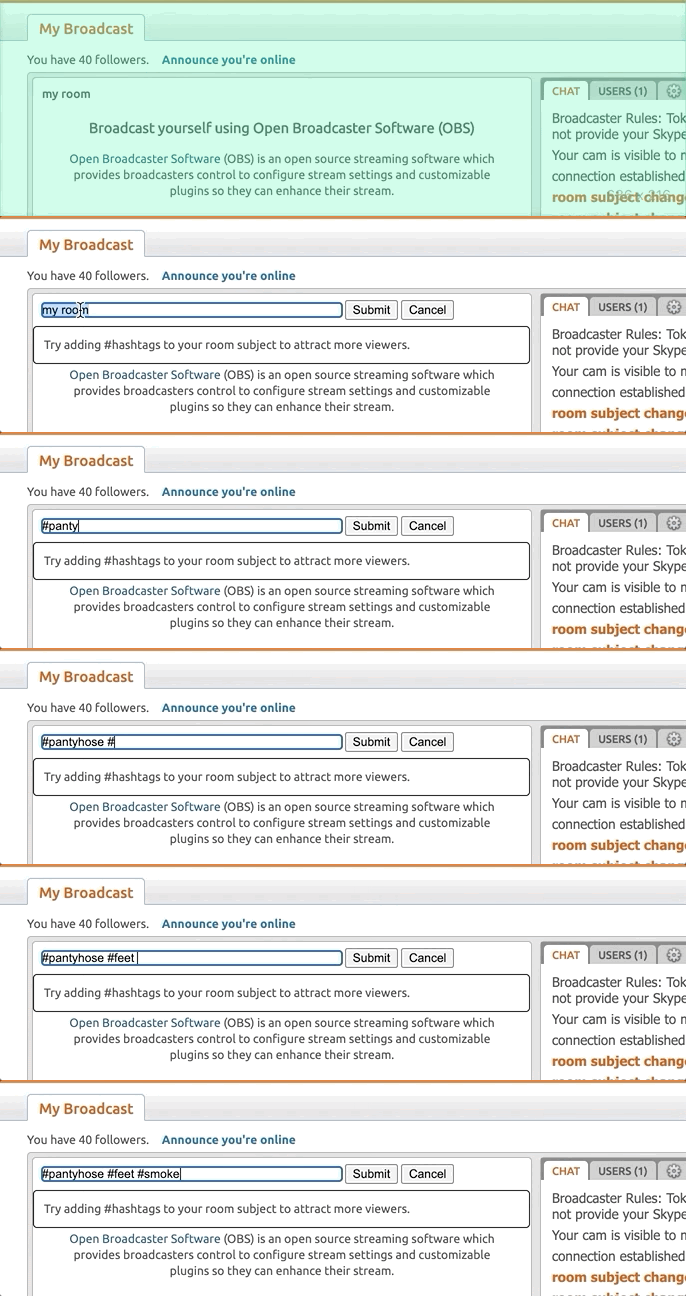
Before starting, choose a clear room subject that matches what your broadcast is actually about. The animation below comes from the official help centre and shows the subject field. Choose your own text and tags to suit your format. Avoid promising something you do not intend to offer simply because it might attract a click.
Your ready-to-go checklist
Tick off what is ready. This is your own planning checklist: it does not submit documents, change your account status or start a broadcast.
Everything ticked. Choose a comfortable time for your first stream.
A few more useful answers
Do I have to pay to register?
Account creation on the official registration page is free. That is not an income promise or a substitute for model verification. There is no reason to pay someone merely to skip ordinary onboarding steps: the platform’s requirements still apply.
Can I prepare everything on my phone?
How comfortable a step feels depends on the device and form you are using. A phone camera can be useful for clear photographs, while a larger screen can make agreements and settings easier to review. Preparing your account does not require starting a broadcast.
What if I already have an account?
Sign in and check your current broadcaster status. You do not need another account for a fresh bio. If you have lost access or cannot continue verification, ask official support for help rather than creating a string of replacement accounts.
Can Lilo Design handle verification for me?
We can help with your bio’s visual design and structure. You complete identity verification yourself through Chaturbate’s official process. Do not send us your ID, password or two-step verification codes. We do not need them for design work.
Sources and updates
Platform requirements checked against official pages on 11 October 2026. Screenshots and the animation come from the help centre, so individual interface elements may differ in your current account. Preparation and design advice are editorial recommendations from Lilo Design.